
Integrating in-person payments
This guide helps you choose the right integration approach for your platform and your connected accounts.
Using Mollie Connect
We recommend using Mollie Connect for platform integrations as it offers:
- Centralized control over payments and terminals across all your connected merchants
- Revenue tools like application fees, split payments, and routing
- Secure authentication without needing to store or manage private API keys
- Scalable onboarding via a standardized OAuth flow
Not using Mollie Connect? If you are initiating payments using a merchant's API credentials directly, most of this guide still applies. See Direct API key integration section.
Overview
Mollie offers two types of devices for accepting in-person payments, both fully compatible with Mollie Connect:
| Mollie Terminals | Mollie Tap App | |
|---|---|---|
| Description | Physical POS terminal hardware provided by Mollie, available in multiple models suited for different environments | Mobile app available on Google Play and App Store to accept payments on eligible Android and iOS devices |
| Hardware required | Dedicated Mollie POS terminal (compare models) | Compatible Android and iOS devices with NFC |
| Payment methods | Card present (contactless, chip, swipe), wallets | Card present (contactless tap), wallets |
Mollie supports two integration methods for these devices:
| Server-side (API) | Mobile Integration (Android Intents) | |
|---|---|---|
| Description | Your server communicates with the Mollie API, which sends instructions to the terminal. Your server receives the result via webhooks. | Your Android app triggers Mollie Tap App on the same device using Android Intents. The Tap App handles payment interactions and returns the result to your app. |
| Compatible devices | Mollie Terminals and Mollie Tap App | Mollie Tap App (Android)* *Does not apply to iOS |
| Best suited for | POS systems, order management platforms, or any scenario where your backend orchestrates payments | Platforms with an existing Android app that merchants use as their primary tool |
Both approaches support core Mollie Connect features including split payments, application fees and delayed routing. See our Mollie Connect documentation for more details.
Choosing your integration method
Use the decision criteria below to determine which approach — or combination of approaches — is right for your platform.
Server-side integration
We suggest a server-side integration if your merchants:
- Operate from fixed locations such as retail stores, restaurants, or service desks
- Need a dedicated, always-ready payment device at the point of sale
- Want to integrate a payment terminal into a POS or order management system running on a secondary device (e.g., tablet or desktop)
Typical platforms: retail POS platforms, restaurant management systems, appointment booking software with on-site payment etc.
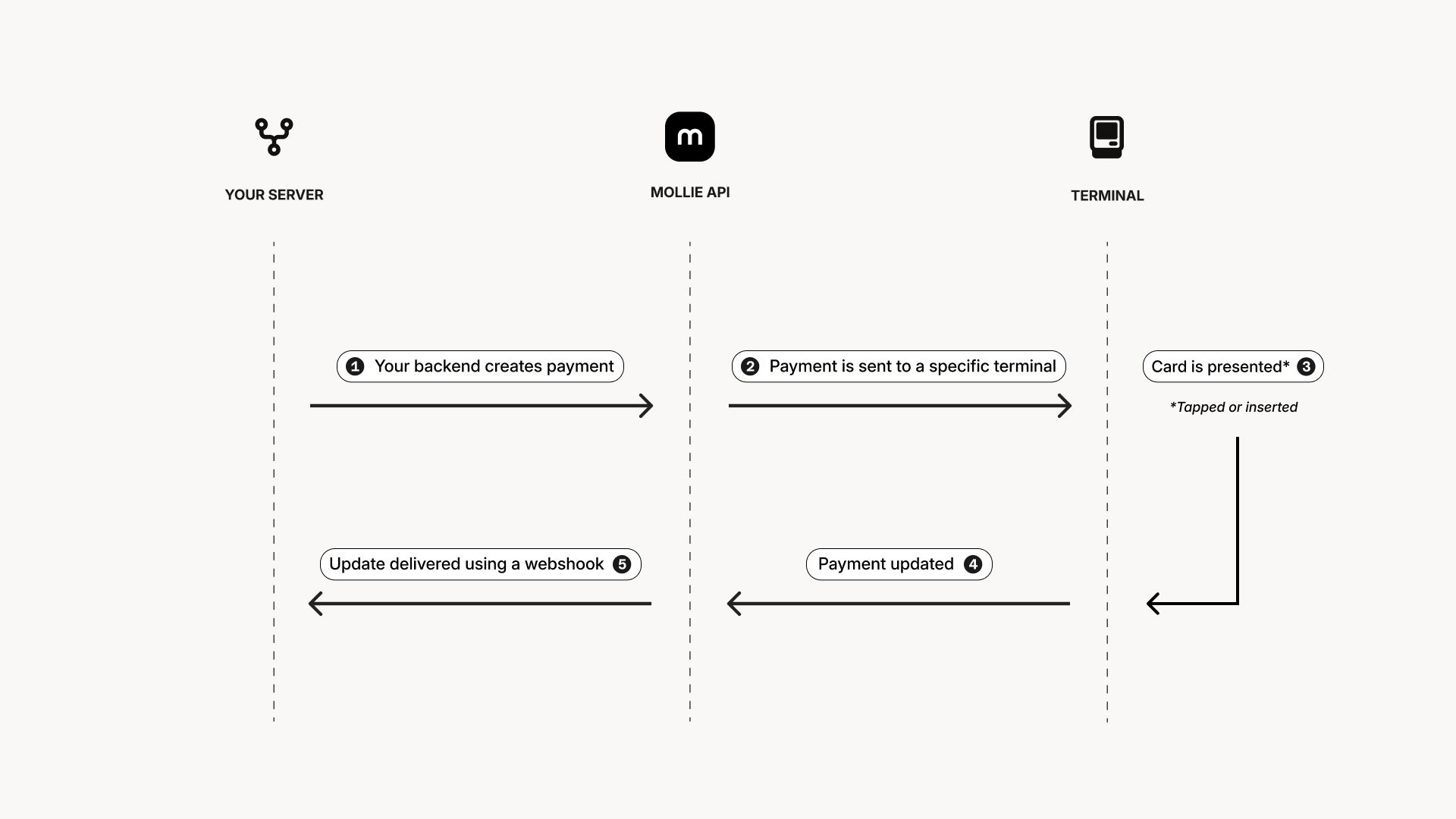
How it works: your backend creates a payment via the Mollie API and assigns it to a specific terminal. The terminal receives the payment instruction, your customer taps or inserts their card and the terminal communicates the result back via the API. Your server receives status updates through webhooks.
Next step: Integrating with Mollie Terminals
Mobile integration
Consider a mobile integration if your merchants:
- Are mobile or on-the-go, such as delivery drivers, market vendors, or field service workers
- Want to accept payments without additional hardware (beyond their Android device)
- Need a lightweight, low-cost way to start accepting in-person payments
- Already use your platform's Android app as their primary tool
Platform examples: hospitality & food ordering, event management & ticketing, delivery and logistics platforms, mobile service marketplaces, field service management software etc.
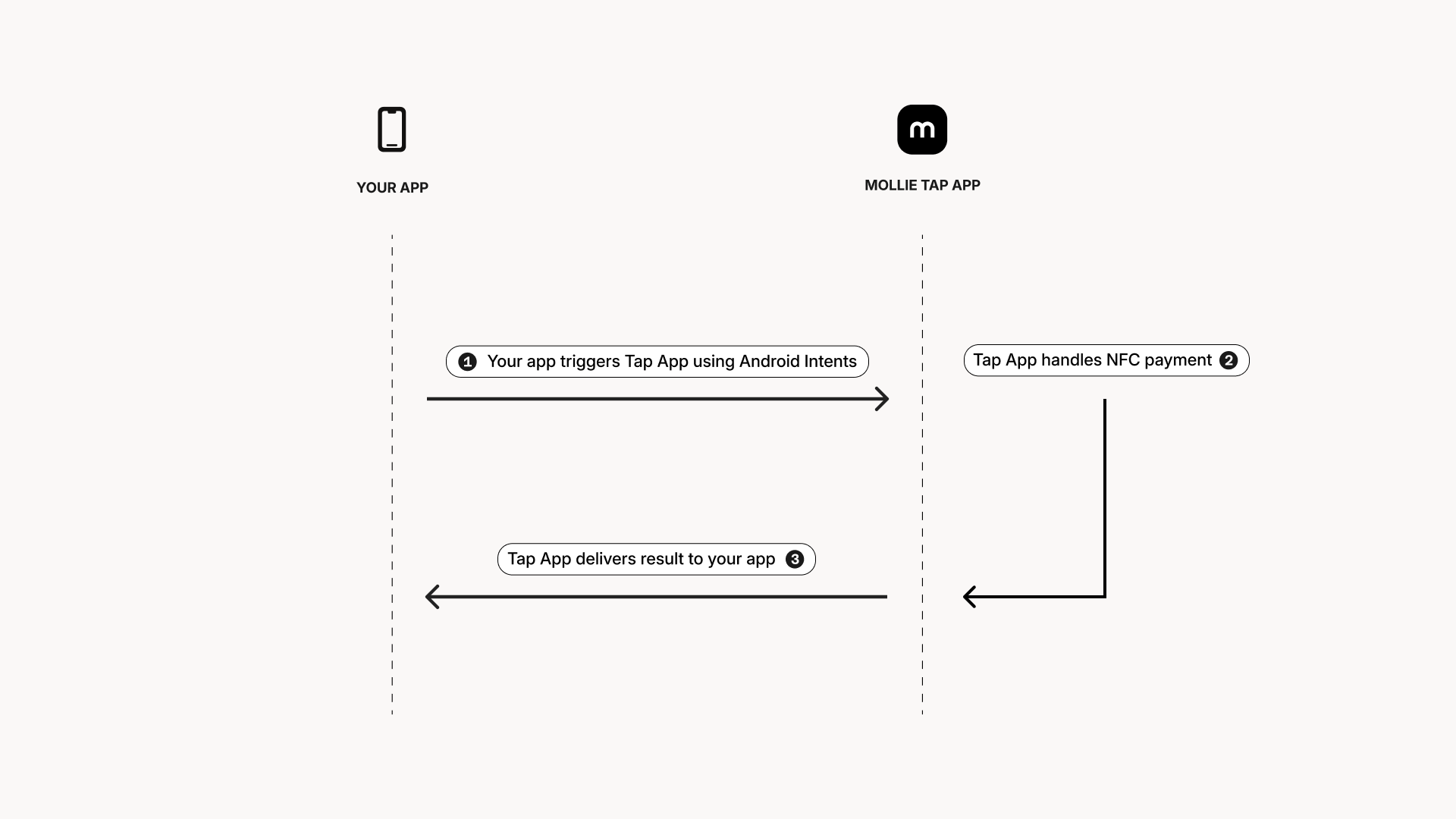
How it works: your Android app triggers Mollie Tap App on the same device using Android Intents. The Tap App handles the NFC payment interaction and returns the result to your app.
The merchant's Android device must have the Mollie Tap App installed from Google Play.
Next step: Integrating with the Mollie Tap App
Hybrid approach
Your platform can integrate both options to cater to different use cases. For example:
- A restaurant platform might offer terminals for accepting payments at the counter and the Tap App for taking orders and payments at the table
- A services marketplace might use terminals at reception desks and the Tap App for technicians making house calls
Since both paths rely on the same Mollie Connect integration for onboarding and managing connected merchants, you can support both without building fundamentally different integrations. The key difference lies in how payments are initiated, however, terminal management and payment reconciliation work consistently across both approaches.
Direct API key integration
Mollie Connect is the recommended approach for platforms. Direct API key (or advanced access token) integration is described here for completeness but comes with significant limitations for platform use cases.
The following differences apply when you are integrating using your merchants' live API credentials compared to Mollie Connect:
| Mollie Connect | Direct API key | |
|---|---|---|
| Authentication | OAuth access token for the connected account | Merchant's live API key or advanced access token |
| Terminal management | Unified management of terminals across all connected accounts | Each merchant manages their own terminals |
| Split payments & routing | Supported | Not available |
| Application fees | Supported | Not available |
| Scalability | Designed for multi-merchant platforms | Requires managing (multiple) API credentials per merchant |
| Merchant onboarding | Streamlined via an OAuth flow | Manual — each merchant provides you their API key (per profile) or advanced access token (per organization) |
And the following features stay the same:
- The choice between server-side and mobile integration still applies — use the comparison table and decision criteria above
- The payment flow, terminal interaction and webhook handling are functionally identical
- The Managing Terminals, Testing, and Go-live checklist guides are still fully relevant
Updated about 2 months ago