
Request Signing allows you to authenticate requests using your own private key that Mollie verifies against a public key you've registered, confirming the request actually came from you and wasn't tampered with in transit.
Once a public key is registered on an access token or API key, every request made with it must be signed, or it will be rejected.
Some scopes require a signing key to be registered before a Live token can be created, while for other scopes it's optional (and it's always optional for Test mode tokens). The token creation screen tells you whether a key is required for the scopes you've selected.
How it works
Say you generate a Ed25519 key-pair (mostly commonly, using OpenSSL or directly inside your cloud secrets manager / KMS). You keep this private key secret and use it to sign each request.
You share the public key with Mollie when you create the token, so we can verify your signatures. Each signed request includes:
X-Client-Signature: theEd25519signature of the request, base64-encoded.X-Client-Signed-At(Required): the UTC timestamp of the signature's creation, inISO 8601format with millisecond precision (e.g.2026-10-13T10:30:00.123Z). A timestamp without milliseconds will be rejected.Idempotency-Key(Optional): if you send this key, it's included in the signed payload. If omitted, an empty value is used instead.
A request with a missing or invalid signature is rejected with the following error: 401 Unauthorized.
Setup
1. Generate key-pair
openssl genpkey -algorithm Ed25519 -out ed25519_private.pem
openssl pkey -in ed25519_private.pem -pubout -out ed25519_public.pem
Keep ed25519_private.pem secret: this is what verifies to Mollie that requests come from you.
2. Share your public key with Mollie
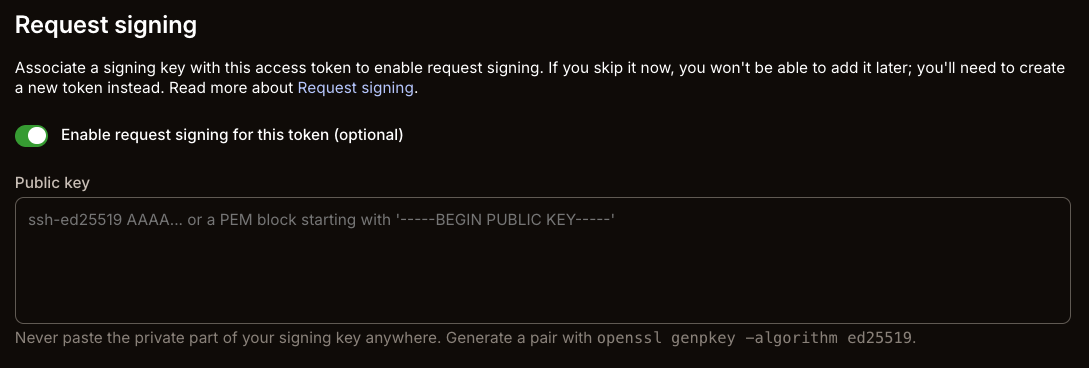
When setting up your access token or API key, paste the contents of ed25519_public.pem into the Public key field in your Mollie Web App > Developers > API keys (when creating a new token).
3. Build the payload and sign it
For every request, build a payload by joining the below listed items with \n:
- HTTP method, lowercase (e.g.
post) - The request path, exactly as sent (e.g.
/v2/...), no query string - The canonical query string: parameters sorted by key, URL-encoded, joined with
&. Empty string if there are none, but still included as an empty line - The value of
X-Client-Signed-At - The value of
Idempotency-Key(or an empty string if you didn't send one) - The
SHA-256hash of the request body, as lowercase hex
Sign that payload with your private key and base64-encode the result: that's your X-Client-Signature.
The body hash must match the exact bytes you send on the wire. Don't reformat, re-order or pretty-print the JSON between hashing and sending it, as any difference will invalidate the signature.
Example (Node.js)
const crypto = require('crypto');
const fs = require('fs');

function canonicalQueryString(params = {}) {
  return Object.keys(params)
    .sort()
    .map((key) => `${encodeURIComponent(key)}=${encodeURIComponent(params[key])}`)
    .join('&');
}

function buildPayload({ method, path, queryParams = {}, signedAt, idempotencyKey = '', body = '' }) {
  const bodyHash = crypto.createHash('sha256').update(body).digest('hex');
  return [method.toLowerCase(), path, canonicalQueryString(queryParams), signedAt, idempotencyKey, bodyHash].join('\n');
}

const privateKey = crypto.createPrivateKey(fs.readFileSync('ed25519_private.pem'));

const signedAt = new Date().toISOString(); // e.g. 2026-10-13T10:30:00.123Z
const idempotencyKey = crypto.randomUUID();
const body = JSON.stringify({ amount: { value: '10.00', currency: 'EUR' } });

const payload = buildPayload({ method: 'POST', path: '/v2/payments', signedAt, idempotencyKey, body });
const signature = crypto.sign(null, Buffer.from(payload, 'utf8'), privateKey).toString('base64');
Send signedAt, idempotencyKey and signature as the X-Client-Signed-At, Idempotency-Key and X-Client-Signature headers on your request, alongside the body.
Replay protection
X-Client-Signed-At must be within 5 minutes of Mollie's server time, in either direction. Requests signed further in the past or future are rejected, so make sure your system clock is accurate before signing.