---
updatedAt: 2026-08-25T14:11:26.000Z
---
Fetch the complete documentation index at: https://docs.mollie.com/llms.txt. Use this file to discover all available pages before exploring further. Append .md to any documentation page URL to get its markdown version.
# Application fees
Application Fees allow your platform to collect a fee on every payment you process on behalf of a connected account. You define the amount, flat, percentage (or a combination of those) and Mollie moves it to your balance automatically when the payment succeeds.
Your connected accounts pay their own [Mollie transaction fee](https://www.mollie.com/pricing) and remain liable for any refunds or chargebacks. The Application Fee sits entirely on top of that.
## How the money moves
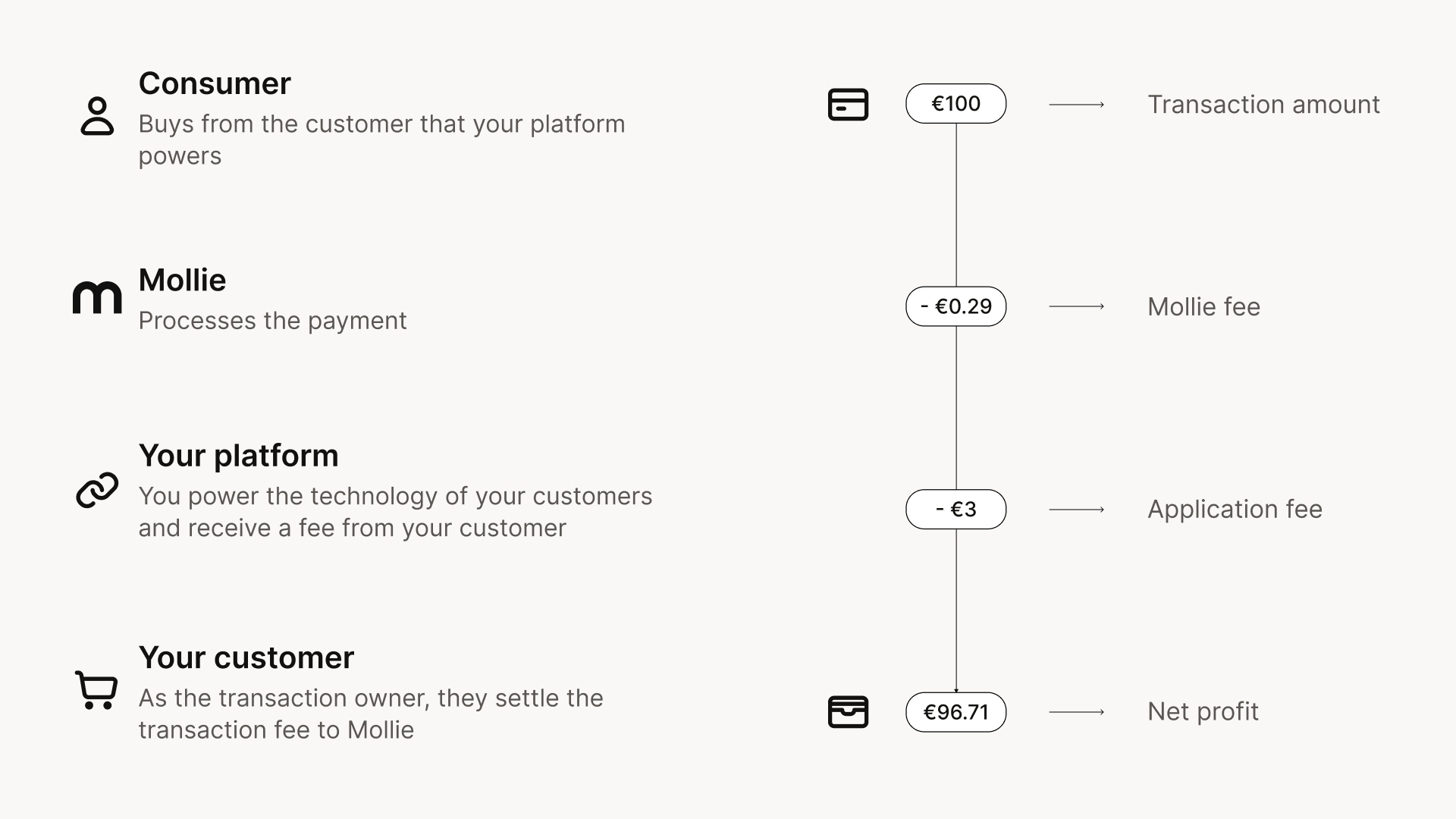
When a payment succeeds, Mollie automatically transfers the Application Fee from your connected account's balance to yours. Your connected account sees it as a named line item on their settlement report, using the description you provided when creating the payment.
For how this fits the platform money-flow model, see [Core concepts](https://docs.mollie.com/docs/core-concepts).
You are responsible for invoicing your connected accounts for the Application Fees you charge and for handling VAT correctly on those fees.
## Creating an Application Fee
Add the `applicationFee` object to your [Create payment](https://docs.mollie.com/reference/create-payment) or [Create subscription](https://docs.mollie.com/reference/create-subscription) request:
```json
{
"amount": { "currency": "EUR", "value": "10.00" },
"description": "Order #12345",
"redirectUrl": "https://example.com/order/12345",
"webhookUrl": "https://example.com/webhooks/mollie",
"profileId": "pfl_zcfJRjkf6P",
"applicationFee": {
"amount": { "currency": "EUR", "value": "1.50" },
"description": "Platform fee for order #12345"
}
}
```
The `applicationFee.description` appears in your settlement reports for both you and your connected account: we recommend using something descriptieve that makes reconciliation easy for both sides.
You can find all received Application Fees in the **Balance** tab of your Mollie Web App.
### Fee limits
The ceiling depends on the API you are using and your commercial arrangement with Mollie.
**Payments API:** the max fee is capped by a formula: \``Max fee = payment amount − (€0.35 + 6% × payment amount)`\`
For a €10.00 payment: €10.00 − (€0.35 + €0.60) = **€9.05 maximum**
The minimum is €0.01.
**Orders API (deprecated):** a 10%/€2.00 cap applies.
**Buy-rate commercial arrangement:** if your platform is on a buy-rate agreement with Mollie, the formula-based cap above does not apply. The effective ceiling is higher. Contact your partner manager for the specific limits that apply to your account.
## Refunds
Application Fees are **non-refundable**. When your connected account refunds a consumer, the full refund amount is deducted from their balance; your Application Fee stays in your balance.
## Finding your Application Fees
* **Mollie Web App → Balance:** a quick overview of received Application Fees per transaction.
* Transaction Margin Report: a CSV export with per-transaction fee details, broken down by connected account and payment method. The most complete view for Connect partners. Generate it from **Reports → Transaction Margin** in your Web App.
* Balance Transactions API: programmatic access to all movements within your balance, including Application Fees. Use this for automated reconciliation.
* Settlements API: Application Fees included per settlement payout. Useful for matching fees to bank payouts.
* [Settlement Report](https://docs.mollie.com/docs/settlement-report): a `CSV` export of all transactions within a settlement, including Application Fees. Useful for bookkeeping purposes.
## Testing
**Test payments do not trigger any balance movement:** no Application Fee is transferred and no Mollie transaction fee is charged.
To verify your fee is working correctly, make a small live payment. Once completed, the Application Fee will appear in the **Balance** tab of your Mollie Web App.